Audience Segments API (2.0)
The functionality has been built into the V3 Campaign Management API docs which can be found here: https://apidocs.mediamath.com/apis/campaigns-api/openapi
Using the Audience Segments API, customers and data providers have control to onboard and activate the data they need to target in MediaMath Platform. As it's a self-service solution, turnaround time for updates is reduced from business days to minutes. The API is built using industry standard, open source REST APIs and is a scaleable way to handle all requests for both global and permissioned taxonomies. The service brings transparency to data activation at MediaMath, allowing customers and data providers oversight of relevant 1st and 3rd party audience data sets as well as the permissioning of those data sets.
There are two ways to expose the data onboarded via server-to-server within MediaMath Platform:
- Taxonomies
- These can be global, meaning all MediaMath customers will have access to the segments within the taxonomy in MediaMath Platform.
- These can be permissioned so that only select MediaMath customers have access to the segments within the taxonomy in MediaMath Platform.
- External Data Segments
- These represent a single segment and are always permissioned.
- These are also referred to as Data Pixels.
It's possible to use both methods to achieve a mix of global and permissioned taxonomies & external data segments to suit your needs and the needs of your customers.
Note: The S2S data transfer is the same for both global and permissioned taxonomies, as well as external data segments.
Taxonomies are presented in MediaMath Platform as a hierarchical tree, where the first node (root node) is the data provider's name. Within the tree, media traders can expand selections of categories of segments and view an estimated audience size (the number of unique users) and a CPM price (USD by default).
In this view, the Audience Targeting view has been annotated to show the elements of a taxonomy:
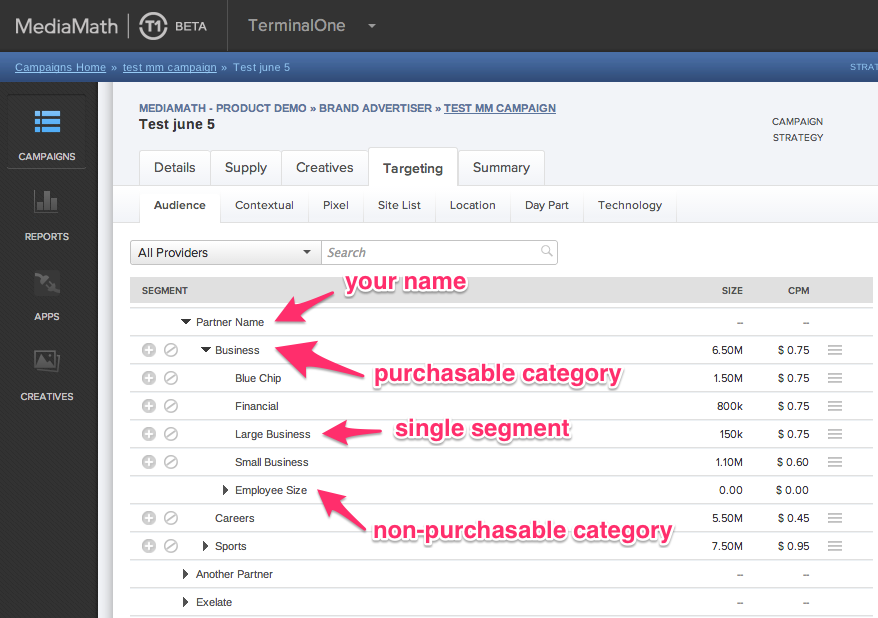
Similar to global taxonomies, permissioned taxonomies are also presented in MediaMath Platform as a hierarchical tree, where the first node (root node) is the data provider's name. Within the tree, media traders can expand selections of categories of segments and view an estimated audience size (the number of unique users) and a CPM price (USD by default).
Permissioned taxonomies can include first and/or third party segments and are 'permissioned' or shared with specified entities, organizations, agencies and/or advertisers in MediaMath Platform.
As all taxonomy management utilizes the same underlying MediaMath API, the information shared in this section applies to both global and permissioned taxonomies, with the exception of the visibility of the taxonomy & permissioning.
Utilizing the API requires the data provider be set up as a data vendor in our system and that MediaMath act as a clearinghouse for all transactions. For third-party data providers, you'll work out terms with our partnerships team; for customers sharing first-party data, the revenue share will typically be set at 0 by our partnerships team.
Each data provider has a default revenue share, mutually agreed upon with the partnerships team; however, this default revenue share value can be overridden at a taxonomy level. For example, if a customer wants to target segments in MediaMath Platform at a rate which they have pre-negotiated with you, their data vendor, the customer's specific rate may require the use of a revenue share different from the default revenue share originally agreed upon between you & MediaMath. To facilitate this, you as the data provider, can create a permissioned taxonomy for the customer and work with the partnerships team to set a revenue share that relates to that specific taxonomy.
To override a revenue share at the taxonomy level, create the taxonomy with permissions and contact MediaMath Support with the following information:
- the Taxonomy_ID,
- the desired taxonomy-level revenue share.
Our team will respond once they have updated the revenue share for the specified taxonomy.
Taxonomies are managed using using the API.
The functionality has been built into the V3 Campaign Management API docs which can be found here: https://apidocs.mediamath.com/apis/campaigns-api/openapi
An external data segment (also known as a data pixel) is the output of a pixel mapping process that results in the creation of a single, permissioned audience segment. In contrast to a permissioned taxonomy, which can be managed via API and contain N segments, an external data segment represents one audience segment and is defined within the Onboard section of the Audiences module in MediaMath Platform.
External data segments are permissioned to specific agencies (MediaMath entity structure): organization > agency > advertiser) so all advertisers within the agency will have access to the external data segment. Prior to getting started, the data provider needs to be added to the agency in MediaMath Platform. To have a data provider added, contact your MediaMath representative.
If the data provider already has the appropriate access, follow these steps to get your external data segments created:
- Define an audience segment by creating an External Data Segment in the Onboard tab within the MediaMath Platform Audience module.
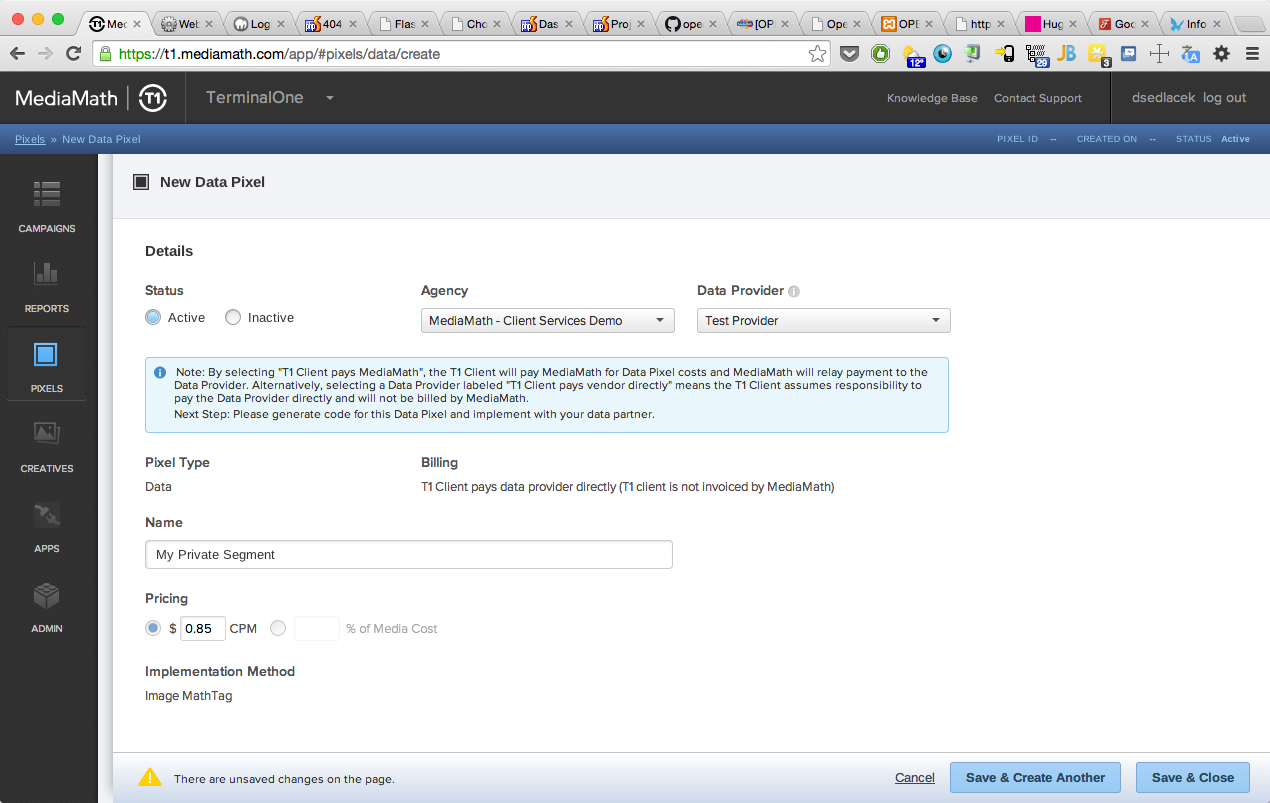
- Provide the pixel IDs created in step 1 to your data provider.
- Data provider will then submit a ticket directly to
pixelmapping@mediamath.com, including the following. Include each external data segment mapping in the body of the email (or Support ticket) in the line-separated format below.
Note: Requests to pixelmapping@mediamath.com are handled via an automated process, as long as the formatting below is followed in the subject and body of your email. If the format does not conform, requests will be handled within 1 business day.
External Data Segment Example Request
Subject Line: Data Provider Pixel Mapping Request
Description:
Please map the following
ns:8473,mm:679001
ns:8474,mm:679002
ns:8675,mm:679003
ns = the name space of the first pixel being mapped, refer below or reach out to MediaMath support if the namespace is unknown.
mm = MediaMath Namespace. This will always be "mm" in the mapping request.
XXXXXX = the partner's segment code sent to MediaMath via S2S.
YYYYYY = the MathTag ID ("MT_ID") associated with the MediaMath external data segment pixel created in step one.